







Okay, this is one that I do not have mastered well enough yet, and still get caught on – not often, but more often than I should, given how long I’ve been doing this. And it’s simple: Check your settings!
As in, each time you take the camera out of the bag, and each time you put it back (either one would be enough, if done consistently, but both is a safety margin.) It’s not a bad idea to ‘normalize’ your settings routinely, either, but pick something and make a habit of it.
What I mean is, know exactly what mode your camera is in, what options, what exposure, what compensation, and so on, before you start snapping frames. It’s easy to have a situation where you want to get the picture as fast as possible, just switching on and focusing before the opportunity is gone, but this does you no good at all if the settings are such that the images won’t come out decently. I suspect I get caught because I have a fairly routine collection of settings, especially for macro work, but enough situations where I deviate for particular reasons. So at the very least, give the LCD the once-over, paying attention to those little details that can trip you up – I’ll provide a short list, but this is geared more towards my own shooting style and demands, and your priorities might be different, so adjust as needed.
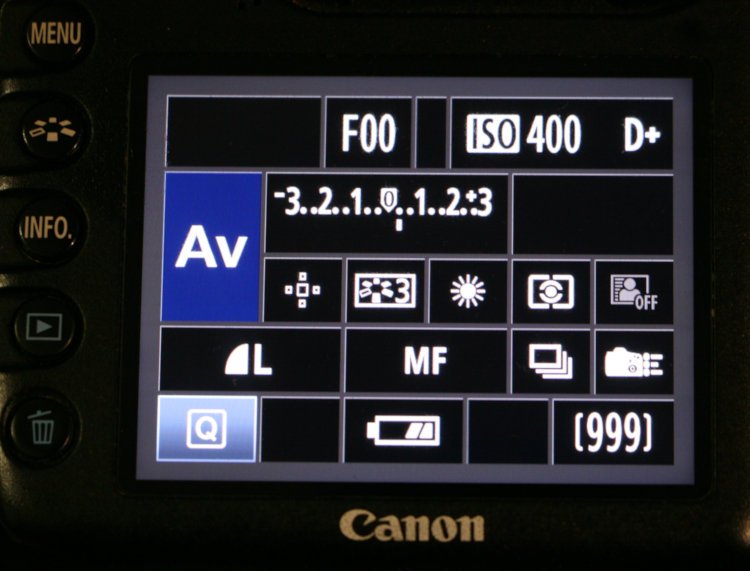
Mode: I’m usually in one of two modes for 90% of my shooting: Aperture Priority, and Manual. Virtually never in Program Auto, and I don’t think I’ve ever used the touristy modes depicted by little icons/emojis, what I call the Ducky-Horsey modes. On occasion when I switch to Shutter Priority or Bulb, however, these will mess me up unless I’m checking.
ISO: Again, most often at 250 for detail, and switching usually means I’m doing more low-light stuff. I don’t forget this often, but on occasion…
White Balance: I almost went past this one, since I virtually never change it, not liking how the camera manages it most times, but it can really shift your images if it’s wrong for conditions.
Exposure Compensation: Probably the most common one missed, both because I switch it so often and because the indicator is subtle. For many situations I’m trying to recognize what effect the subject and background are going to have on the camera’s automatic exposure setting (in Aperture Priority of course,) and will be tweaking this to try and produce the best results. Usually, it’s not more than 2/3 of a stop, which isn’t too bad, until the subject/setting really calls for going in the opposite direction. Most times when I’m caught on this, however, is when I’m switching back and forth between birds in the sky and against a darker background, like deep in the foliage or against the dark foliage reflecting off of the water. I’m usually in Canon’s Evaluative Metering, which does indeed compare the focus point against the surrounding frame and should automatically compensate for this, but too often, the subject in the focus point is much smaller than the area around it that Canon reads from, so it’s usually setting exposure for the background, i.e., the bright sky.
Custom Modes: On Canons this is ‘Picture Style,’ of which I’m usually using one of three, all set for specific lighting conditions: Normal, Low Contrast/Saturation, and High Contrast/Saturation. The latter two are set to oppose existing conditions to keep things under control, i.e., in high contrast conditions like bright sunlight, I switch to Low Contrast/Saturation to help prevent blowouts or inky-dark shadows, but will use the opposite when the light is overcast or muted.
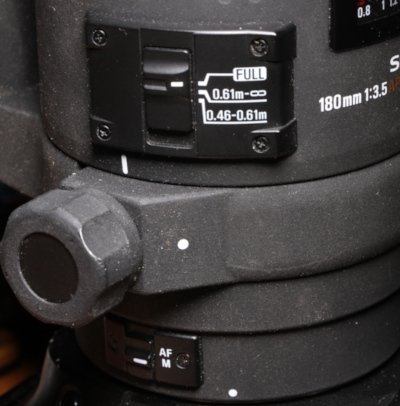 Lens settings: This is an insidious one, because it usually doesn’t show unless you turn the camera body to look at the lens barrel. Autofocus may be switched on or off, stabilization on or off, or the focus limiter set for something other than what you want. Stabilization is the trickiest, because you may not discover until you unload the images that it was switched off…
By the way, I will insert something here as a bonus tip. If you’re in an area where you’re switching back and forth between a general-purpose wider-angle lens, and a telephoto, it’s often a good idea to revert to the telephoto as a default, switching lenses even when the situation doesn’t immediately call for it. Here’s the reasoning: telephoto subjects like birds, deer, bears, etc. may pop up suddenly and present only a fleeting chance, not waiting around you for to do the lens change, while the wider-angle subjects, and even the macro ones, are typically less demanding that you get the shot within a few seconds or they’re gone, and will give you time to switch. It may mean more lens changes than is absolutely necessary, which does increase the odds of introducing dust into the interiors of both lens and camera body, but this habit has stood me well many times over. Ideally of course, you’d have two camera bodies and so both lenses are mounted, and you’ve at least seen photographers with two or more cameras at the ready. This is heavy and awkward, however, and I have yet to do a full session like this, especially since I can’t stand camera straps and hanging the damn things around my neck; when the long lens is mounted, camera and lens usually remain in hand, and then, where would I put them when I need the wide-angle camera? When the lens is detached, though, it gets stowed in a long lens case.
Other things to be aware of:
Metering Modes: Especially switching to Spot Metering, which is very easy to forget is in use, and it usually requires a certain presence of mind to be using in the first place.
Focus Modes: I don’t switch these often at all, but you might, and if you do, keep an eye on them.
Auto-Bracketing: There’s nothing more annoying than firing off three or more frames when you’re trying for candid or specifically-timed shots.
Menu and Custom Function Settings: In my own cases, this is most often Mirror Lock-up or higher frame rates, but things like Flash Sync mode, Flash Compensation, Noise Reduction, button assignments, and so on. Going from Mirror Lock-up to trying to track a bird flying past is seriously annoying, not to mention next to impossible as the viewfinder blacks out on the first shutter press, and while a second press will trip it as intended, you’ll have no idea where the bird is.
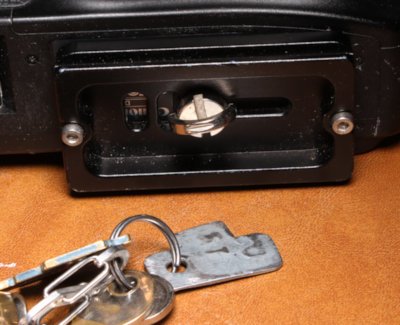 Quick-release plates: This is a sneaky one if you’ve gotten used to them, and there’s nothing worse than getting someplace remote to set up on a tripod and finding out you removed the mounting plate earlier when you were using a flash bracket – this has made me not only carry an extra plate or two in the camera bag, the flash bracket now attaches to the quick release plate.
By the way, I now have a custom ‘screwdriver’ blade attached to my keyring specifically to tighten and loosen QR plates, because I rarely carry coins anymore and those little loops provided on the mounting screws are nowhere near enough to tighten a plate properly – they need to be cranked down.
What’s in the bag: If there’s something that you normally carry and you remove it for whatever reason, impress it upon your mind fiercely to put it back as soon as possible. This could be the QR plates previously mentioned, batteries, rain ponchos, your remote release, flash cords – whatever. if you’re almost anxious that you took it out in the first place, this is not a bad frame of mind to have, since such things are easy to forget and never notice until you’re on location and need them.
The Gig Check: Hoo boy, if you’re heading out on a paid assignment or a specific shooting situation, sit down and go over everything – have a list if it helps. Batteries charged, extra memory cards (or plenty of film,) all lenses in place, all accessories you might need handy, camera(s) and lenses clean and easy to access, special items added. This should also include backup equipment and contingencies for any failures, so yes, at least a second body and lenses to cover all likely focal lengths. Also, clothing you might need – I even carry spare sandals in the car when on student outings, since I had a blowout once and had to have The Girlfriend bring me another pair. Hat, sunscreen, water, parka, bear repellent, flare gun, portable helicopter – it’s easy to become overloaded, but bad if you need it and don’t have it, and if you’re under contract, this can have legal ramifications.
So, I reiterate: check those settings, and develop good habits to make it automatic. Even keep some of those frames where you didn’t, and the shot was ruined because of it, to remind yourself – it really does help. Good luck!
Did you spot that key element? It’s the aperture setting, reading “F00,” meaning a lens isn’t attached – or, in this case, a manual-focus lens not even intended for this camera, the Mamiya 80mm macro on an adapter.